CloudCockpit Team | Published September 15, 2026; updated: October 19, 2026
No, not on the existing subscription. A CSP growth margin applies to new subscription purchases, so mid-term seat expansion earns it only when the incremental seats go on a new subscription. Growth margin went live on October 1, 2026 for Direct Bill partners and Distributors, which makes this rule a detail worth getting right in every quote and renewal.
Does adding seats mid-term earn a growth margin?
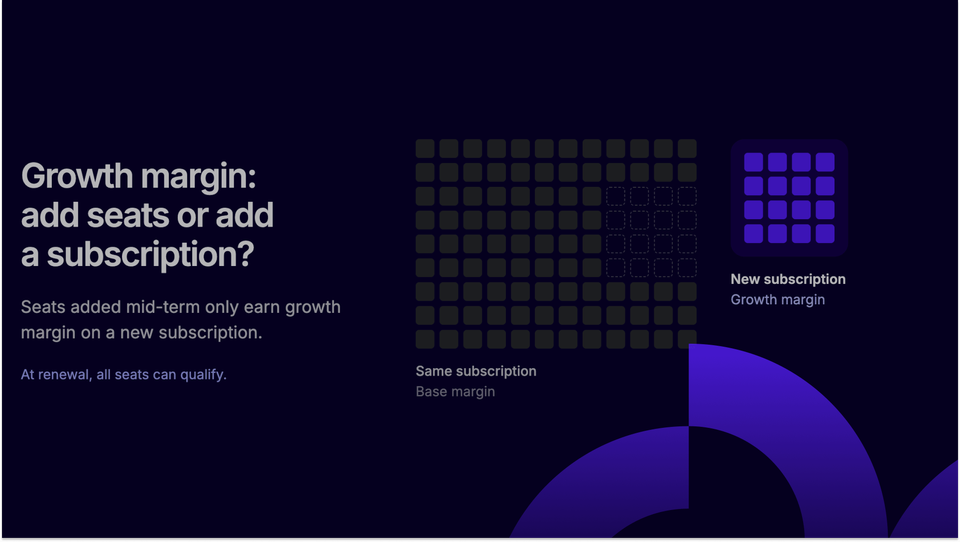
No. Seat quantity updates on an existing subscription are not evaluated for a growth margin, including seat expansion and Strategic SKU Mix scenarios. For mid-term seat expansion, the incremental seats must be placed on a new subscription. Only those new seats earn the growth margin, and the existing seats remain at base margin.
The one partner-initiated exception on an existing subscription is a mid-term upgrade: immediate, partial or scheduled. Partner Center evaluates it and shows a Discount for this upgrade in the Pricing and discounts view.
For a Direct Bill partner, this means the default "increase quantity" action is the wrong action whenever a growth margin is in play.
CloudCockpit note: Because ineligibility is non-blocking, a quantity increase still processes at base margin. Nothing stops the transaction, so the lost margin surfaces only if someone checks the review page or the reconciliation file. Make "new subscription, not quantity change" a line in the quote checklist for strategic SKUs.
What is the difference between increasing the quantity and creating a new subscription?
Increasing the quantity changes the seat count on the subscription you already have, and Partner Center does not evaluate that change for a growth margin.
Creating a new subscription for only the additional seats is a separate purchase that can earn one. In this context, "mid-term" means a change made during the subscription term, as opposed to "at renewal", and "seat expansion" means adding seats.
| Increase quantity on the existing subscription | Create a new subscription for the added seats | |
|---|---|---|
| What you do | Change the seat count of the current subscription | Purchase a separate subscription containing only the added seats |
| Growth margin evaluated | No | Yes, if the offer's criteria are met |
| Margin on the added seats | Base margin | Base margin plus growth margin, if eligible |
| Margin on the existing seats | Base margin | Base margin, they stay on the original subscription |
| Seat requirements | None for growth margin purposes | Minimum net-new seats and the expansion multiplier |
| Reducing seats later | Standard rules | Only above the required quantity; below it, the whole subscription must be canceled within the cancellation window |
| Where you see the margin | No growth margin appears | Review page, cart line item and the reconciliation file |
How many new seats does the new subscription need?
The new subscription must meet both the minimum net-new seat requirement and the seat expansion multiplier. Microsoft defines the requirement as:
- Required new seats = max(minimum net-new seats, existing qualifying seats x expansion multiplier)
The result is the number of new seats required, not the total after purchase. A 2x multiplier requires two new seats for every existing qualifying seat, and a 1x multiplier does not let existing seats count toward the new-seat requirement. The minimum and the multiplier vary by offer: the growth margin details in the Partner Center Pricing workspace list them as minSeats and seatIncreaseMultiplier.
Read both fields for the specific SKU before you quote the customer, because the larger of the two sets the number of seats you need to sell.
What changes at renewal?
At renewal, no separate subscription is required. All seats, existing and new, earn the growth margin if the customer qualifies under the then-current criteria.
Partner Center can also evaluate eligibility before renewal when the renewal schedule is configured to indicate growth, and it updates the scheduled next-term benefit based on the result.
Because the criteria are applied at that moment, a customer who qualified mid-term is not guaranteed to qualify at renewal. Treat the renewal date as a margin checkpoint, not only a billing event.
Which partners and products are in scope?
Growth margins apply only to Direct Bill partners and Distributors. Indirect resellers are not eligible.
According to Microsoft's October 1, 2026 announcement, partners can earn incremental margin on top of base margin when they drive qualifying growth across Microsoft 365 Copilot, Microsoft 365 E5, Microsoft 365 E7, Microsoft Defender Suite, Microsoft Purview Suite and Windows 365 Enterprise. Eligibility is evaluated at the customer tenant level across Microsoft channels and partners, and it is locked when the transaction finishes.
Growth margins are partner-earned economics, not a customer-facing discount. Customer pricing remains unchanged.
Why would a customer be ineligible?
Partner Center returns the reason when a transaction does not qualify. The documented reasons are:
- Not new-to-offer: the customer already has the product on the tenant within the lookback period (three years by default, unless the Growth Margin Guide specifies otherwise).
- Below minimum seats: the transaction is under the configured minimum.
- Expansion multiple not met: the new seats do not meet the multiple of existing seats.
- Seats updated on existing subscription: growth margin requires a new subscription unless it is a supported mid-term upgrade.
- Strategic SKU Mix not met: the tenant's mix is below the threshold, or the customer is already above it.
- Channel-shift excluded: seats that originate from a channel shift, for example EA to CSP, do not count as growth.
- Specialized Offer precedence: a Specialized Offer on the SKU takes precedence over growth margin.
Check these reasons first when a quote that looked eligible comes back without the margin.
What happens if the customer reduces seats later?
Seat reductions are allowed only above the growth margin seat requirement. The maximum reduction is the purchased new seats minus the required new seats. For example, if the required new-seat quantity was 100 and the customer purchased 120, the subscription can be reduced by 20 seats.
If seats drop below the minimum required, the entire subscription must be canceled within the cancellation window. Standard new commerce cancellation applies: a prorated refund within the first seven days of any term, except where otherwise required by law.
Growth margin eligibility persists when a subscription is transferred between partners during the term, and the receiving partner inherits the growth margin pricing for the remainder of the term.
CloudCockpit note: The floor is set by the original required quantity, not the quantity purchased. Record the required-new-seat number against the subscription at purchase so support and renewal teams know how far it can shrink.
How do growth margins interact with promotions and Specialized Offers?
Customer promotions stack with growth margin. An eligible customer-facing promotion is applied after the partner price, so margin comes first and the promotion second. Specialized Offers do not stack: when one exists for the SKU, its pricing takes precedence and growth margin is not applied.
The Bottom Line
Growth margin rewards net-new growth, and Partner Center enforces that at the subscription level: mid-term seats need a new subscription, while renewal evaluates all seats together. Growth margin has been live since October 1, 2026 for Direct Bill partners and Distributors, so every quote on a strategic SKU should start with an eligibility check. Expect eligibility rules and offers to keep shifting through FY27, and check the Growth Margin Guide in the Partner Center Pricing workspace before each quarter's planning.